Skip to content
December 5, 2025

Techs & Gizmos

Hands On Review For Latest Gadgets & Gizmos

  • Home
  • Windows
  • Mac
  • Others
    • Tutorials
    • Drivers
  • Privacy Policy
  • Contact Us
Main Menu
Windows

How to reset Microsoft account password in Windows 10 [Steps]

December 8, 2021 - by Sachin Prakash

Tips to reset Microsoft account password in Windows 10:

In this post, we are going to discuss on “How to reset Microsoft account password in Windows 10/8/7”. You will be guided with easy steps/methods to do so. Let’s starts the discussion.

‘Microsoft Account’: Microsoft Account is sign-on account meaning that this single account can be used to log-on or sign-in into various different services by Microsoft and partner sites. In Windows 11/10/8 computer, Microsoft Accounts are commonly used to sign-in into Microsoft Store, Windows Phone devices, Xbox video game systems, Outlook.com, Skype, Microsoft 365, OneDrive, and more.

If you have forgotten your Microsoft Account password and want to recover or reset Microsoft Account password, then you can follow our instructions to do so. Here, you are provided with easy steps to perform Microsoft account password reset operation or recover Microsoft Account Password. Let’s go for the steps.

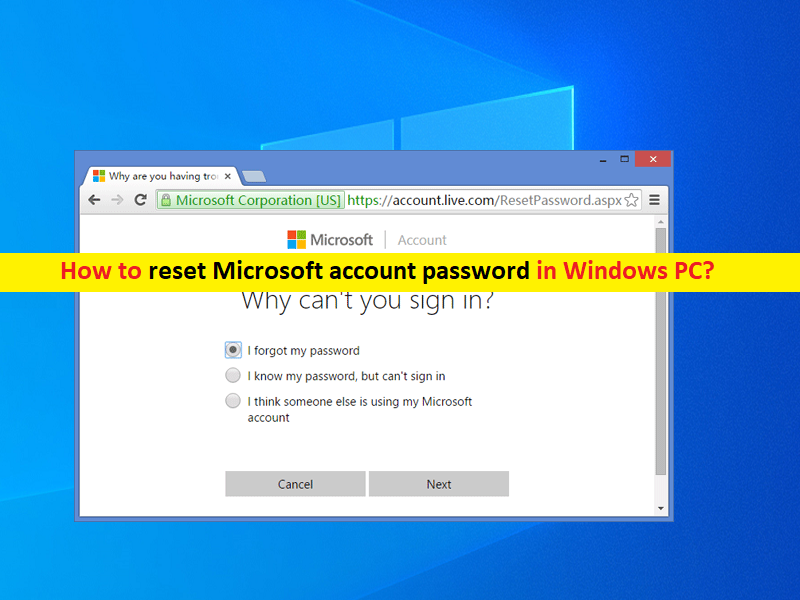
How to reset Microsoft account password in Windows PC?

Step 1: Open your browser like Google Chrome in your Windows PC/Smartphone and open ‘https://account.live.com/password/reset’ page or ‘Recover Microsoft Account’ page official

Step 2: In the opened page, enter your Microsoft email address or alternate email address, phone number, or skype name relating to your Microsoft Account, and then hit ‘Next’
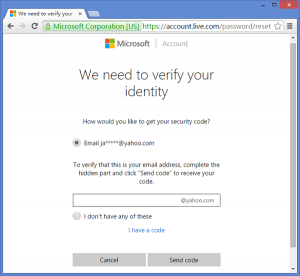
Step 3: Enter the code that was generated by your Authenticator App or sent to your alternate email address or phone number. Choose ‘Use a different verification option’ if you need to.

Step 4: Enter last 4 digit of your phone number or complete email address if asked to complete these information, and then you will receive a verification code by the next. Complete the information and then ‘Get Code’

Step 5: Enter the verification code you received and select ‘Next’. You might have to complete the other verification process if you have two-step verification turned ON

Step 6: Enter the desired new password. It must be a minimum of 8-characters and is password sensitive. Re-enter the password and hit ‘Next’

Step 7: Now, select ‘Sign-in’ to login into your Microsoft account using new password and check if you can successfully login into your Microsoft account.

Conclusion

I am sure this article helped you on How to reset Microsoft account password in Windows PC with several easy steps/methods. You can read & follow our instructions to do so. That’s all. For any suggestions or queries, please write on comment box below.
TaggedHow to reset Microsoft account password

Related Posts

How to fix Windows Update Error 0x80070422 Manually?

September 14, 2024

How to fix Windows Update Error 0x80070020?

September 14, 2024

How to fix Windows Update Error 0x80070003? Simple and Easy Methods

September 13, 2024

Post navigation

Previous Article How to reinstall graphics drivers in Windows 10/8/7 [Steps]
Next Article How to fix Hulu error 94 on Android/Apple TV and Windows PC [Steps]

About Sachin Prakash

View all posts by Sachin Prakash →

Recent Posts

  • How to fix Windows Update Error 0x80070422 Manually?
  • How to fix Windows Update Error 0x80070020?
  • How to fix Windows Update Error 0x80070003? Simple and Easy Methods
  • How to fix Windows Update Error 0x80070017?
  • How to fix Windows Update Error 0x80070002? Simple and Easy Methods
  • How to fix Service Registration is Missing or Corrupt Error?
  • How to fix Outlook Error 0x800ccc0f?
  • How to fix Outlook Error Code 0x8004210A? Simple and Effective & Methods
Copyright © 2025 Techs & Gizmos.
Powered by WordPress and HitMag.
We use cookies on our website to give you the most relevant experience by remembering your preferences and repeat visits. By clicking “Accept All”, you consent to the use of ALL the cookies. However, you may visit "Cookie Settings" to provide a controlled consent.
Cookie SettingsAccept All
Manage consent

Privacy Overview

This website uses cookies to improve your experience while you navigate through the website. Out of these, the cookies that are categorized as necessary are stored on your browser as they are essential for the working of basic functionalities of the website. We also use third-party cookies that help us analyze and understand how you use this website. These cookies will be stored in your browser only with your consent. You also have the option to opt-out of these cookies. But opting out of some of these cookies may affect your browsing experience.
Necessary
Always Enabled
Necessary cookies are absolutely essential for the website to function properly. These cookies ensure basic functionalities and security features of the website, anonymously.
CookieDurationDescription
cookielawinfo-checkbox-analytics11 monthsThis cookie is set by GDPR Cookie Consent plugin. The cookie is used to store the user consent for the cookies in the category "Analytics".
cookielawinfo-checkbox-functional11 monthsThe cookie is set by GDPR cookie consent to record the user consent for the cookies in the category "Functional".
cookielawinfo-checkbox-necessary11 monthsThis cookie is set by GDPR Cookie Consent plugin. The cookies is used to store the user consent for the cookies in the category "Necessary".
cookielawinfo-checkbox-others11 monthsThis cookie is set by GDPR Cookie Consent plugin. The cookie is used to store the user consent for the cookies in the category "Other.
cookielawinfo-checkbox-performance11 monthsThis cookie is set by GDPR Cookie Consent plugin. The cookie is used to store the user consent for the cookies in the category "Performance".
viewed_cookie_policy11 monthsThe cookie is set by the GDPR Cookie Consent plugin and is used to store whether or not user has consented to the use of cookies. It does not store any personal data.
Functional
Functional cookies help to perform certain functionalities like sharing the content of the website on social media platforms, collect feedbacks, and other third-party features.
Performance
Performance cookies are used to understand and analyze the key performance indexes of the website which helps in delivering a better user experience for the visitors.
Analytics
Analytical cookies are used to understand how visitors interact with the website. These cookies help provide information on metrics the number of visitors, bounce rate, traffic source, etc.
Advertisement
Advertisement cookies are used to provide visitors with relevant ads and marketing campaigns. These cookies track visitors across websites and collect information to provide customized ads.
Others
Other uncategorized cookies are those that are being analyzed and have not been classified into a category as yet.
SAVE & ACCEPT