Skip to content
December 5, 2025

Techs & Gizmos

Hands On Review For Latest Gadgets & Gizmos

  • Home
  • Windows
  • Mac
  • Others
    • Tutorials
    • Drivers
  • Privacy Policy
  • Contact Us
Main Menu
Windows

How to fix 0x80280013 login error windows 10?

August 8, 2022 - by Samir Prakash

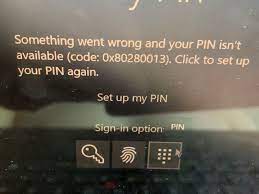
Hi dear! I am dealing with an issue. All the time when I try to log-into my Windows 10 computer with my PIN or fingerprint, I receive an error code 0x80280013. Please, tell me why this error occurs and how could I get rid of the problem. Thanks in advance.

Windows Operating System from Microsoft gains popularity because of its user-friendly interface, many customization abilities, built-in troubleshooters, and many other useful features. Such complex systems must rely on thousands of processes to run smoothly.

If something wrong happens with such processes, people start encountering various errors, bugs, glitches and other mal-functions. Quite recently, users have reported about experiencing 0x80280013 login error Windows. The error message is likely to occur when they try to log-in to their device.

In some cases, the error message keeps appearing constantly, multiple times in a week which is very annoying. Users are asked to change their PIN or password. While it is not yet clear what could cause the error under discussion, we have provided below six possible fixes that would help you in resolving it.

Some people have claimed that resetting their PIN or biometrics helped them in resolving the issue others have to look for the option of updating their drivers or reinstalling Windows.  Keeping in mind that the manual troubleshooting methods can be a lengthy process, we recommend you use PC Repair Tool.

This tool is capable of fixing almost all Windows related issues. It can check for system errors, corrupted files, BSODs and registry others. Here is its direct downloading link. Download it and run a full system scan using it to find and fix the issue automatically.

Download PC Repair Tool

Possible fixes for 0x80280013 login error Windows

Fix 1: Reset PIN

  • Open File Explorer,
  • Click on the View tab and select Show Hidden Files,
  • Browse to C:\Windows\ServiceProfiles\LocalService\AppData\Local\Microsoft\Ngc,
  • Next, Delete Ngc.old folder (you may rename it) to reset the PIN,
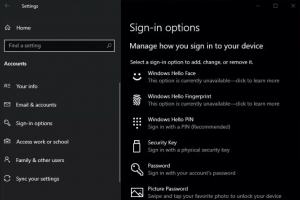
  • Now, go to the Windows Settings> Accounts> Sign-In options and add a PIN.
Fix 2: Reset Windows Hello Biometrics

  • Open Windows Services and search for Windows Biometric service,
  • Click on Stop the service,
  • Now, create a new folder with name WinBIoBack somewhere on your computer,
  • Next, open Windows Explorer and go to C:\Windows\System32\WinBioDatabase,
  • Backup all the Dat files in the newly created folder,
  • Delete the original WinBioDatabase folder,
  • Then, go to the Service again, search for Windows Biometric Service and click on Restart the Service option,
  • Open Account Settings, click on Sign-in options and then complete the registration process to complete registration of your Biometrics and see if the next if 0x80280013 login error windows continues.

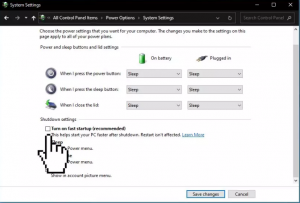
Fix 3: Turn off Fast Startup

  • Open Control Panel, and select Power Options,
  • Click on Choose what the power buttons do,
  • Then, click on Change Settings that are currently unavailable,
  • Uncheck Turn on fast startup (recommended) and save the changes.
Fix 4: Update Drivers

  • Right-click on Start menu and select Device Manager,
  • Expand Network adapters,
  • Right-click on it and select Update Driver,
  • Pick Search automatically for drivers,
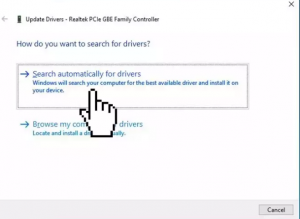
  • Wait till the driver update is installed,
  • Restart your device to make the changes to take effects,
  • See the next if 0x80280013 login error windows persists.

Alternatively, use automatic driver updating tool to update it automatically. Here is its direct download link:

Get Automatic Driver Update Tool

Fix 5: Restore System

  • Click on Start menu, type restore and select create a Restore Point,
  • Then, click System Restore and follow the prompt till you select a restore point,
  • Select the restore point where the issue was not there with your system.

Fix 6: Repair Install Windows

If none of the fixes help you and you still encounter 0x80280013 login error windows, make sure you repair install Windows:

  • Download the Windows 10 ISO,
  • Mount it, and then double-click on setup.exe file to start the repair, install from the mounted driver,
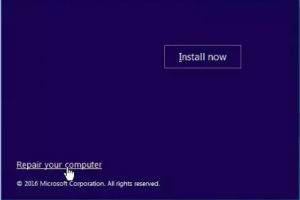
  • Read the License Terms and click on Accept option,
  • Windows 10 will then check for updates and install the ones available,
  • Click Install once done and follow the on-screen instructions to complete the installation process.
Conclusion

That’s all! We have provided all possible fixes for 0x80280013 login error windows. Hope so, these fixes are helpful for you in getting rid of the issue. Comment down below in case of any queries, questions or suggestions regarding the article.
Tagged0x80280013 login error windows

Related Posts

How to fix Windows Update Error 0x80070422 Manually?

September 14, 2024

How to fix Windows Update Error 0x80070020?

September 14, 2024

How to fix Windows Update Error 0x80070003? Simple and Easy Methods

September 13, 2024

Post navigation

Previous Article How to Fix DistributedCOM error 10005 Windows 10 [Steps]
Next Article How to fix resampledmo.dll missing in windows 11?

About Samir Prakash

View all posts by Samir Prakash →

Recent Posts

  • How to fix Windows Update Error 0x80070422 Manually?
  • How to fix Windows Update Error 0x80070020?
  • How to fix Windows Update Error 0x80070003? Simple and Easy Methods
  • How to fix Windows Update Error 0x80070017?
  • How to fix Windows Update Error 0x80070002? Simple and Easy Methods
  • How to fix Service Registration is Missing or Corrupt Error?
  • How to fix Outlook Error 0x800ccc0f?
  • How to fix Outlook Error Code 0x8004210A? Simple and Effective & Methods
Copyright © 2025 Techs & Gizmos.
Powered by WordPress and HitMag.
We use cookies on our website to give you the most relevant experience by remembering your preferences and repeat visits. By clicking “Accept All”, you consent to the use of ALL the cookies. However, you may visit "Cookie Settings" to provide a controlled consent.
Cookie SettingsAccept All
Manage consent

Privacy Overview

This website uses cookies to improve your experience while you navigate through the website. Out of these, the cookies that are categorized as necessary are stored on your browser as they are essential for the working of basic functionalities of the website. We also use third-party cookies that help us analyze and understand how you use this website. These cookies will be stored in your browser only with your consent. You also have the option to opt-out of these cookies. But opting out of some of these cookies may affect your browsing experience.
Necessary
Always Enabled
Necessary cookies are absolutely essential for the website to function properly. These cookies ensure basic functionalities and security features of the website, anonymously.
CookieDurationDescription
cookielawinfo-checkbox-analytics11 monthsThis cookie is set by GDPR Cookie Consent plugin. The cookie is used to store the user consent for the cookies in the category "Analytics".
cookielawinfo-checkbox-functional11 monthsThe cookie is set by GDPR cookie consent to record the user consent for the cookies in the category "Functional".
cookielawinfo-checkbox-necessary11 monthsThis cookie is set by GDPR Cookie Consent plugin. The cookies is used to store the user consent for the cookies in the category "Necessary".
cookielawinfo-checkbox-others11 monthsThis cookie is set by GDPR Cookie Consent plugin. The cookie is used to store the user consent for the cookies in the category "Other.
cookielawinfo-checkbox-performance11 monthsThis cookie is set by GDPR Cookie Consent plugin. The cookie is used to store the user consent for the cookies in the category "Performance".
viewed_cookie_policy11 monthsThe cookie is set by the GDPR Cookie Consent plugin and is used to store whether or not user has consented to the use of cookies. It does not store any personal data.
Functional
Functional cookies help to perform certain functionalities like sharing the content of the website on social media platforms, collect feedbacks, and other third-party features.
Performance
Performance cookies are used to understand and analyze the key performance indexes of the website which helps in delivering a better user experience for the visitors.
Analytics
Analytical cookies are used to understand how visitors interact with the website. These cookies help provide information on metrics the number of visitors, bounce rate, traffic source, etc.
Advertisement
Advertisement cookies are used to provide visitors with relevant ads and marketing campaigns. These cookies track visitors across websites and collect information to provide customized ads.
Others
Other uncategorized cookies are those that are being analyzed and have not been classified into a category as yet.
SAVE & ACCEPT