Skip to content
December 5, 2025

Techs & Gizmos

Hands On Review For Latest Gadgets & Gizmos

  • Home
  • Windows
  • Mac
  • Others
    • Tutorials
    • Drivers
  • Privacy Policy
  • Contact Us
Main Menu
Windows

Fix this sign in option is disabled because of failed sign-in attempts Windows 10

May 14, 2022 - by adileqbal

Many of you would have faced this issue where a pop-up came with a message this sign-in option has been disabled because of failed sign-in attempts or repeated shutdowns on the windows login screen. This happens because of a fail-safe mechanisms built-in your operating system that decide the number of failed login attempts before the user gets locked out also know as Account Locked Threshold policy setting. Windows 10 users have the access to value between 0-999 for number of failed attempts one can do before the system gets locked out.

Microsoft has confirmed that if your connection is dropping very frequently and the apps tries to sing in but fails then it can be the result that can get you locked out. This is the case when a user has made no incorrect login attempts into your account or an app.

We have discussed all the solution and instructions possible that you can follow through and try to fix problem which have cause you such inconvenience.
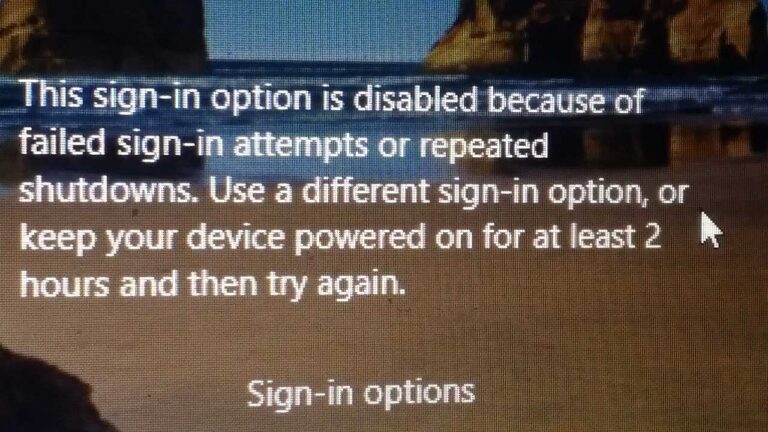
How to Fix ‘Disabled Sign-In option because of failed sign-in attempts or repeated shutdowns’ problem in Windows 10  

Keeping your Windows Turned ON for few hours

Just follow the on-screen instruction of keeping your computer turned on for couple of hours and retry to sign in to your account and check whether it work or not.

Unlock Using Administrator Account

Another way to fix this issue is to try and Sign-In to your computer using another administrator account and then unlocks the locked account that causes this problem.
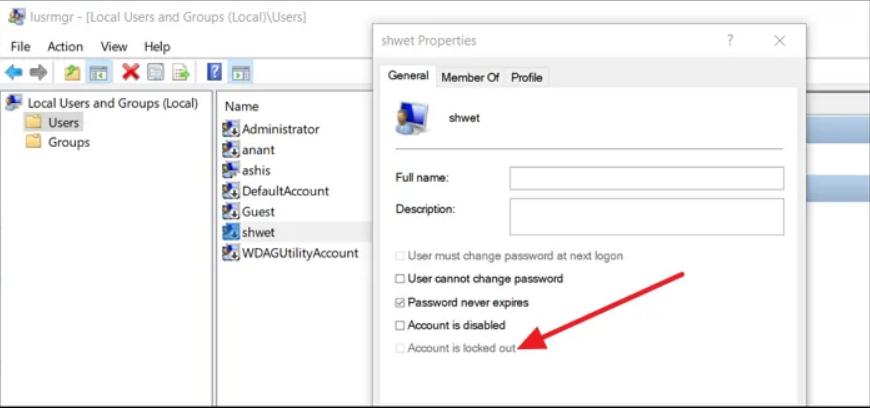
Step 1: Reboot your windows and sign in with your Administrator account.

Step 2: Open RUN dialogue box by pressing Win + R key simultaneously on your keyboard.

Step 3: Type lusrmgr.msc and click OK to open a window labeled Users and Groups.

Step 4: Click User folder in the opened window and select locked user account.

Step 5: Open Properties by right clicking on it.

Step 6: Un-check Account is locked and save the setting.

Reboot your computer and try to sign in with the locked user account to see if the issue has been solved or not.

Change Account Lockout Policy in Windows 10

If you have the access to other Administrator Account then only you can change the account lockout policy to solve this issue. To do so just follow the steps

Step 1: Open RUN by pressing both Win + R key on your keyboard.

Step 2: Type gpedit.msc and OK.

Step 3: A Group Policy Editor window will appear. Navigate to the following path

Computer Configuration\Windows Settings\Security Settings\Account Policies\Account Lockdown Policy
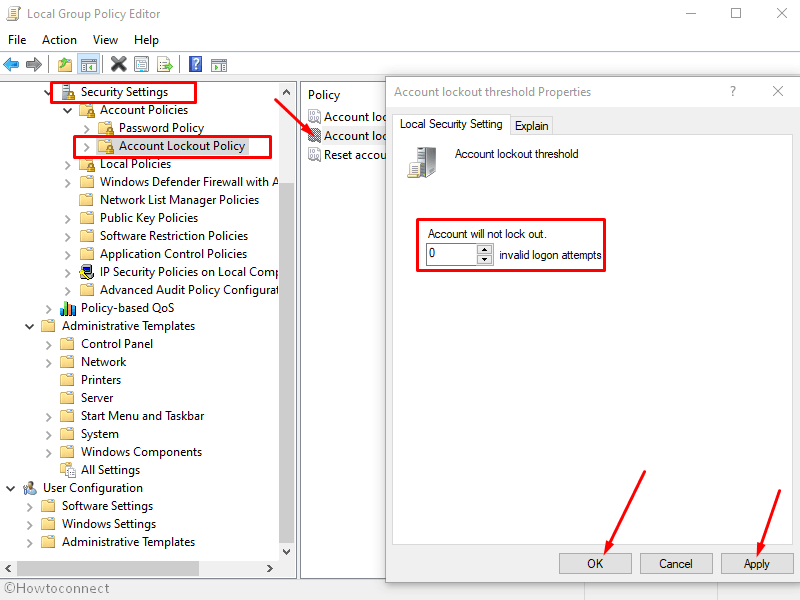
Step 4: On the corresponding window you will see three policies including Account Lockout Duration, Account Lockout Threshold and Reset account lockout counter after policies.

Step 5: Change Lockout Threshold Policies to “0”.
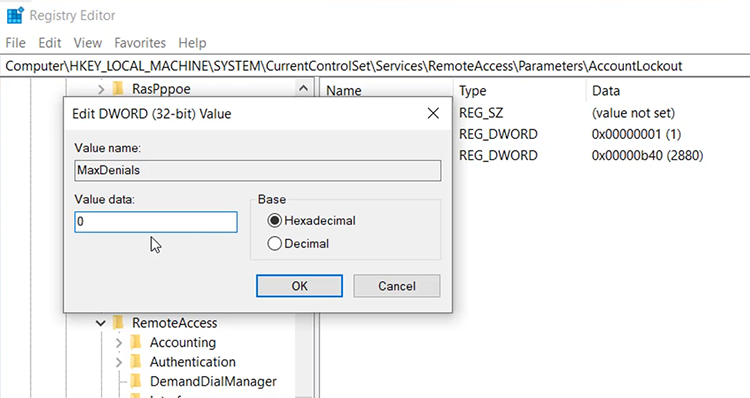
Step 6: If you want to you can also change the Account Lockout Duration. This will make sure that after a certain amount of time you can regain you lockout account access.  

Step 7: Reboot you computer to check if the issue has been resolved.

This error is quite common to run into and can be especially irritating when you are about to do something important. That being the case, we have given you all the possible solutions and methods that you can follow through and see if it helps or not. System error can be very bothersome to hand and fix and it requires a large amount of time to go after fix one by one. So we suggest you to try our PC Repair Tool. You can easily solve and in a short amount of time all BSOD, dll, missing registries with proficiency. It uses a complex algorithm with advanced mechanics to solve all your computer issue with a single click.

⇓Download PC Repair Tool Here⇓

TaggedFix this sign in option is disabled because of failed sign in attempts windows 10solve this sign in option is disabled because of failed sign in attempts windows 10

Related Posts

How to fix Windows Update Error 0x80070422 Manually?

September 14, 2024

How to fix Windows Update Error 0x80070020?

September 14, 2024

How to fix Windows Update Error 0x80070003? Simple and Easy Methods

September 13, 2024

Post navigation

Previous Article How to Fix Windows 11 Insider Preview taskbar not working [Steps]
Next Article How to Fix Windows 11 update stuck at 94 [SOLVED]

About adileqbal

View all posts by adileqbal →

Recent Posts

  • How to fix Windows Update Error 0x80070422 Manually?
  • How to fix Windows Update Error 0x80070020?
  • How to fix Windows Update Error 0x80070003? Simple and Easy Methods
  • How to fix Windows Update Error 0x80070017?
  • How to fix Windows Update Error 0x80070002? Simple and Easy Methods
  • How to fix Service Registration is Missing or Corrupt Error?
  • How to fix Outlook Error 0x800ccc0f?
  • How to fix Outlook Error Code 0x8004210A? Simple and Effective & Methods
Copyright © 2025 Techs & Gizmos.
Powered by WordPress and HitMag.
We use cookies on our website to give you the most relevant experience by remembering your preferences and repeat visits. By clicking “Accept All”, you consent to the use of ALL the cookies. However, you may visit "Cookie Settings" to provide a controlled consent.
Cookie SettingsAccept All
Manage consent

Privacy Overview

This website uses cookies to improve your experience while you navigate through the website. Out of these, the cookies that are categorized as necessary are stored on your browser as they are essential for the working of basic functionalities of the website. We also use third-party cookies that help us analyze and understand how you use this website. These cookies will be stored in your browser only with your consent. You also have the option to opt-out of these cookies. But opting out of some of these cookies may affect your browsing experience.
Necessary
Always Enabled
Necessary cookies are absolutely essential for the website to function properly. These cookies ensure basic functionalities and security features of the website, anonymously.
CookieDurationDescription
cookielawinfo-checkbox-analytics11 monthsThis cookie is set by GDPR Cookie Consent plugin. The cookie is used to store the user consent for the cookies in the category "Analytics".
cookielawinfo-checkbox-functional11 monthsThe cookie is set by GDPR cookie consent to record the user consent for the cookies in the category "Functional".
cookielawinfo-checkbox-necessary11 monthsThis cookie is set by GDPR Cookie Consent plugin. The cookies is used to store the user consent for the cookies in the category "Necessary".
cookielawinfo-checkbox-others11 monthsThis cookie is set by GDPR Cookie Consent plugin. The cookie is used to store the user consent for the cookies in the category "Other.
cookielawinfo-checkbox-performance11 monthsThis cookie is set by GDPR Cookie Consent plugin. The cookie is used to store the user consent for the cookies in the category "Performance".
viewed_cookie_policy11 monthsThe cookie is set by the GDPR Cookie Consent plugin and is used to store whether or not user has consented to the use of cookies. It does not store any personal data.
Functional
Functional cookies help to perform certain functionalities like sharing the content of the website on social media platforms, collect feedbacks, and other third-party features.
Performance
Performance cookies are used to understand and analyze the key performance indexes of the website which helps in delivering a better user experience for the visitors.
Analytics
Analytical cookies are used to understand how visitors interact with the website. These cookies help provide information on metrics the number of visitors, bounce rate, traffic source, etc.
Advertisement
Advertisement cookies are used to provide visitors with relevant ads and marketing campaigns. These cookies track visitors across websites and collect information to provide customized ads.
Others
Other uncategorized cookies are those that are being analyzed and have not been classified into a category as yet.
SAVE & ACCEPT