Skip to content
December 5, 2025

Techs & Gizmos

Hands On Review For Latest Gadgets & Gizmos

  • Home
  • Windows
  • Mac
  • Others
    • Tutorials
    • Drivers
  • Privacy Policy
  • Contact Us
Main Menu
Windows

How to fix NVIDIA user account locked windows 10?

August 5, 2022 - by Samir Prakash

NVIDIA is a pioneer leader in the GPU Industry. It produces graphic processing units are used in computers, cell-phones, game consoles and other electronic devices. It provides an online e-commerce where you can register and make purchases like many other online marketplaces.

Recently, many a user reported about NVIDIA user account locked windows 10. The affected users found problem in signing in to their account. All the time, they receive a message that their account is locked.  There are many possible reasons what could lead into this error.

Repeated actions of attempting to sign-in using invalid credentials or connecting via public network is one such reason. We have compiled a list of solutions below that would help you in resolving the issue as these helped many users:

Possible fixes for NVIDIA user account locked windows 10

Fix 1: Renew Your IP Address

Some websites won’t function on public IP address because of security concern so it temporarily freezes the account. You should reset the IP address and regenerate a new IP address from the steps below:

  • Press Windows key and type Command Prompt in the search box,
  • Right-click on the Command Prompt and select Run as Administrator,
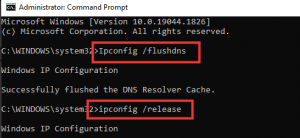
  • On the command line, type the below commands and hit Enter:

Ipconfig /flushdns

ipconfig /release

ipcongig /renew
  • Next, use the below commands to fix any wrong network configuration:

netsh int ip reset

netsh winsock reset
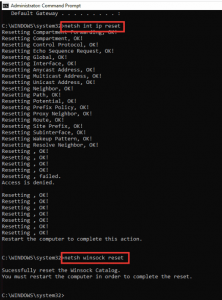
  • Close the command once done and then restart your device to see If the problem persists.

Fix 2: Reset your Account Password

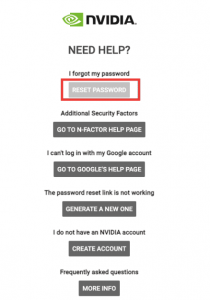
If the above method didn’t work, you should simply reset your account password. For this, you should go to the Need Help logging in option and select the option that says Forget my Password the next. The entire steps are straightforward, you can check the complete steps provided below:

  • Go to the NVIDIA official website,
  • Click on Log-in and then click Need help logging in,

  • Select Reset Password,

  • Enter your registered email address and click Submit button,
  • Now, go to the email inbox and open the password reset email,
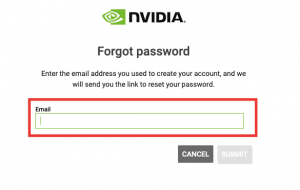
  • Click on the link to reset your password.

If NVIDIA user account locked windows 10 continues, you should contact NVIDIA Support to get your account unlocked.

Fix 3: Technical Support from NVIDIA Team

If the problem continues, consider contacting NVIDIA technical support staff by asking a question or through a live chat with their representative. Here are the steps how to live chat support to solve NVIDIA user account locked issue:

  • Visit NVIDIA official website,
  • Click on Support option,
  • Then, click Explore Support Options,
  • Scroll down and select Chat Now,
  • Fill in the requirements and finally submit it,
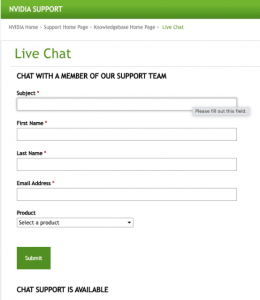
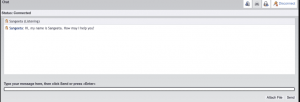
  • After a few minutes, you will be able to chat with a representative in a live chat window.
Conclusion

That’s all! We have provided complete detailed guide how to fix NVIDIA user account locked windows 10. Hope so, these fixes are helpful for you in getting the required fix. Comment down below how impactful this article is for you.

You can check for the Windows related issues if these are possibly causing the problem. Use PC Repair Tool – the professionally suggested and highly recommended tool for the purpose. Here is its direct downloading link provided for you.
Download PC Repair Tool
Taggednvidia user account locked windows 10

Related Posts

How to fix Windows Update Error 0x80070422 Manually?

September 14, 2024

How to fix Windows Update Error 0x80070020?

September 14, 2024

How to fix Windows Update Error 0x80070003? Simple and Easy Methods

September 13, 2024

Post navigation

Previous Article How to Fix Windows 10 network profile missing [Steps]
Next Article How to fix Netflix error code nw-6-503?

About Samir Prakash

View all posts by Samir Prakash →

Recent Posts

  • How to fix Windows Update Error 0x80070422 Manually?
  • How to fix Windows Update Error 0x80070020?
  • How to fix Windows Update Error 0x80070003? Simple and Easy Methods
  • How to fix Windows Update Error 0x80070017?
  • How to fix Windows Update Error 0x80070002? Simple and Easy Methods
  • How to fix Service Registration is Missing or Corrupt Error?
  • How to fix Outlook Error 0x800ccc0f?
  • How to fix Outlook Error Code 0x8004210A? Simple and Effective & Methods
Copyright © 2025 Techs & Gizmos.
Powered by WordPress and HitMag.
We use cookies on our website to give you the most relevant experience by remembering your preferences and repeat visits. By clicking “Accept All”, you consent to the use of ALL the cookies. However, you may visit "Cookie Settings" to provide a controlled consent.
Cookie SettingsAccept All
Manage consent

Privacy Overview

This website uses cookies to improve your experience while you navigate through the website. Out of these, the cookies that are categorized as necessary are stored on your browser as they are essential for the working of basic functionalities of the website. We also use third-party cookies that help us analyze and understand how you use this website. These cookies will be stored in your browser only with your consent. You also have the option to opt-out of these cookies. But opting out of some of these cookies may affect your browsing experience.
Necessary
Always Enabled
Necessary cookies are absolutely essential for the website to function properly. These cookies ensure basic functionalities and security features of the website, anonymously.
CookieDurationDescription
cookielawinfo-checkbox-analytics11 monthsThis cookie is set by GDPR Cookie Consent plugin. The cookie is used to store the user consent for the cookies in the category "Analytics".
cookielawinfo-checkbox-functional11 monthsThe cookie is set by GDPR cookie consent to record the user consent for the cookies in the category "Functional".
cookielawinfo-checkbox-necessary11 monthsThis cookie is set by GDPR Cookie Consent plugin. The cookies is used to store the user consent for the cookies in the category "Necessary".
cookielawinfo-checkbox-others11 monthsThis cookie is set by GDPR Cookie Consent plugin. The cookie is used to store the user consent for the cookies in the category "Other.
cookielawinfo-checkbox-performance11 monthsThis cookie is set by GDPR Cookie Consent plugin. The cookie is used to store the user consent for the cookies in the category "Performance".
viewed_cookie_policy11 monthsThe cookie is set by the GDPR Cookie Consent plugin and is used to store whether or not user has consented to the use of cookies. It does not store any personal data.
Functional
Functional cookies help to perform certain functionalities like sharing the content of the website on social media platforms, collect feedbacks, and other third-party features.
Performance
Performance cookies are used to understand and analyze the key performance indexes of the website which helps in delivering a better user experience for the visitors.
Analytics
Analytical cookies are used to understand how visitors interact with the website. These cookies help provide information on metrics the number of visitors, bounce rate, traffic source, etc.
Advertisement
Advertisement cookies are used to provide visitors with relevant ads and marketing campaigns. These cookies track visitors across websites and collect information to provide customized ads.
Others
Other uncategorized cookies are those that are being analyzed and have not been classified into a category as yet.
SAVE & ACCEPT